This project includes confidential information. Please connect with me for access. Thank you!

Role
UX/Learning Designer
Team
Learning Solution, TIDB
Duration
January 2023 - December 2025
Overview
I joined the Learning Solutions team as the only designer and the only technical person. There was no existing design practice, no online learning infrastructure, and no one in a UX role. Over nearly three years, I helped build the team’s digital learning program from scratch, brought UX methodology into government processes, and became the go-to person for anything involving design, technology, or creative problem-solving within the team.
Trademarks eServices - UX Redesign
The Problem
The Trademarks eServices platform is the public-facing tool for filing trademark applications in Canada. The existing interface listed all 12 trademark types; 2 traditional and 10 non-traditional in a flat grid with no differentiation or guidance. Applicants and agents routinely selected incorrect types, particularly confusing non-traditional categories like “Three Dimensional Shape” with standard design marks.
This led to a high volume of incorrectly identified applications, triggering costly round trips: CIPO staff would flag the error, contact the applicant, wait for corrections, and repeat. The goal was to reduce these errors at the source.
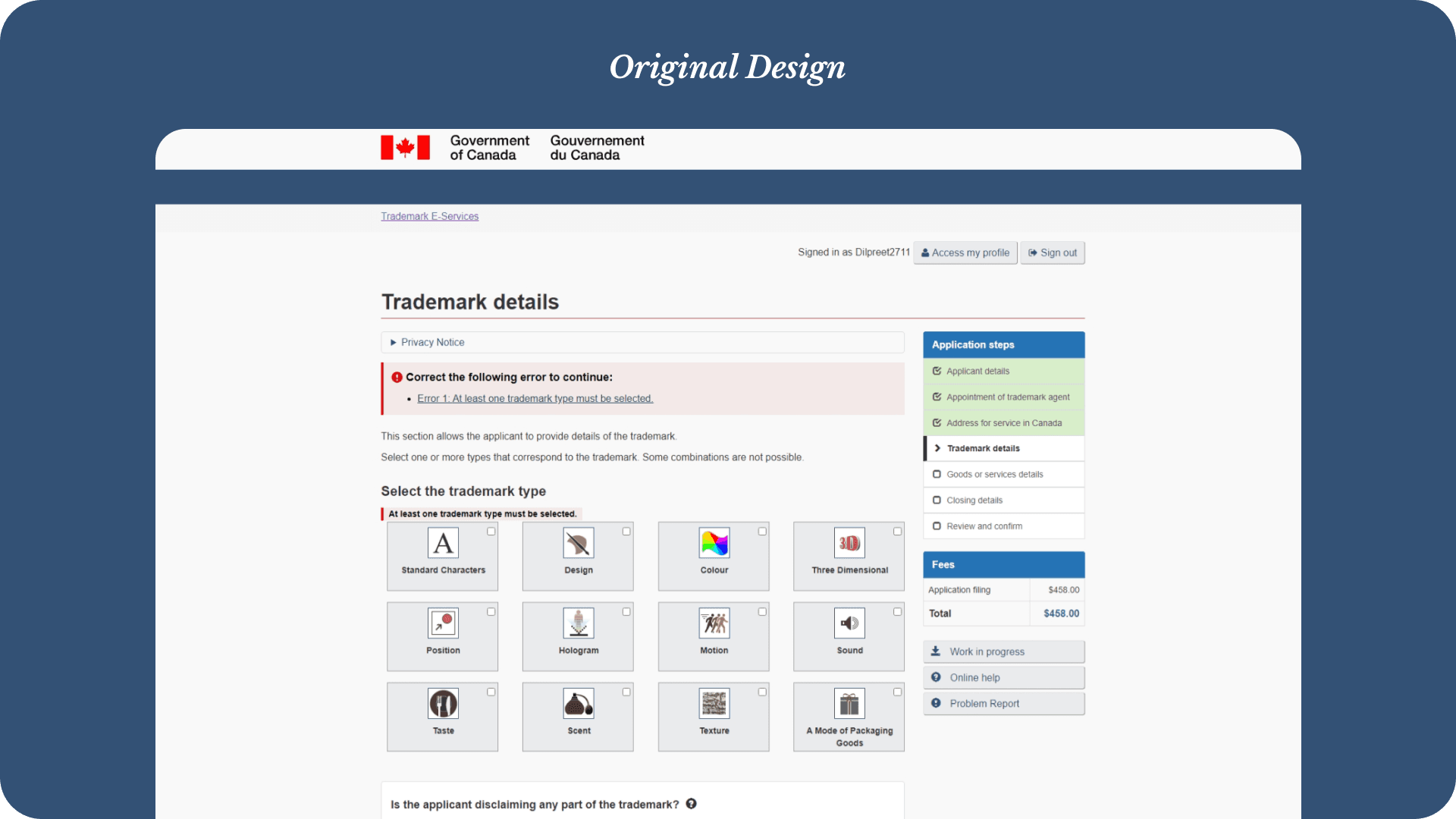
The Solution
I proposed a multi-layered approach designed to reinforce correct selection at every step of the interaction:
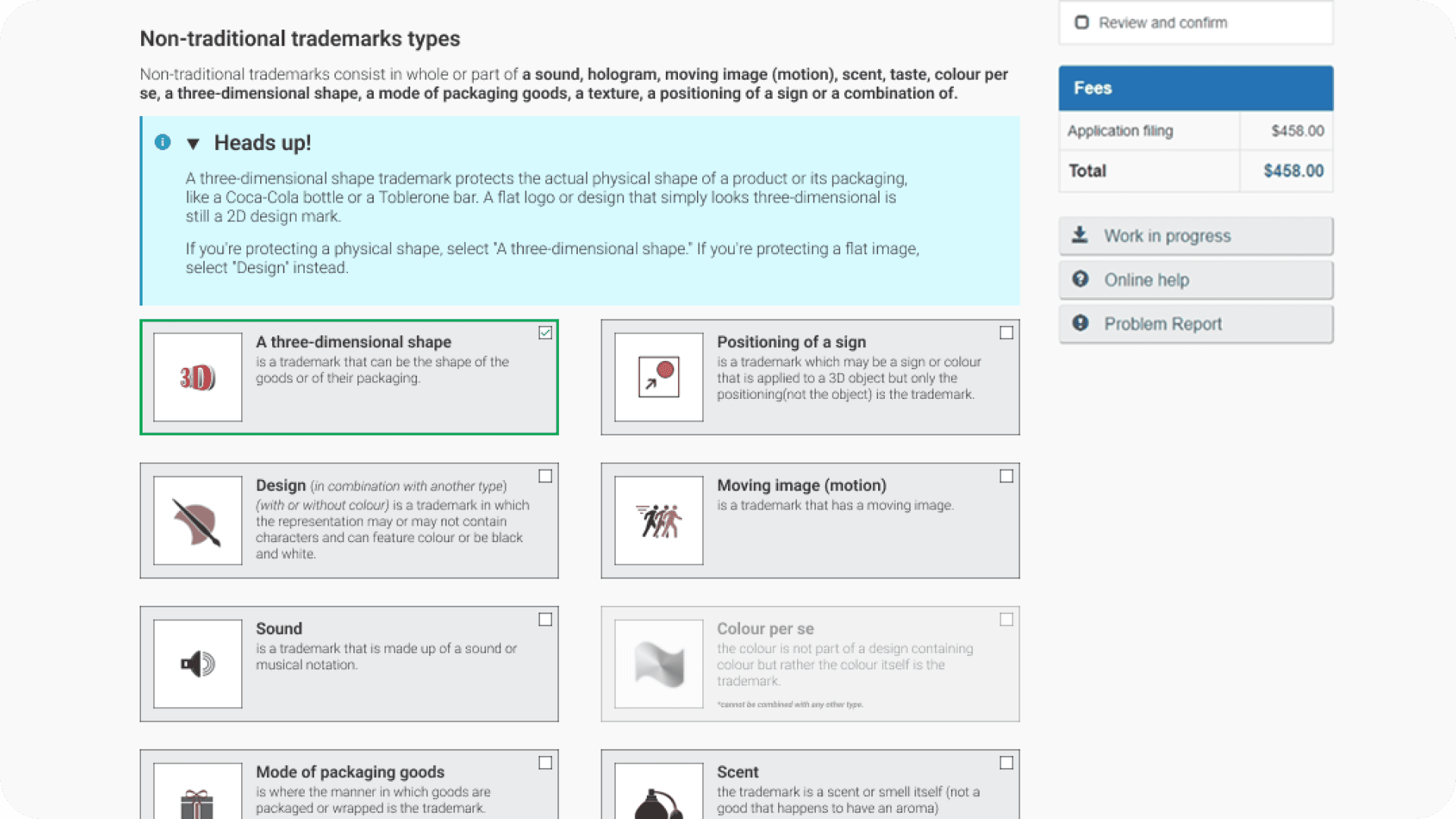
Separate traditional and non-traditional marks into clearly labeled sections with definitions for each category, making the fundamental distinction visible before any selection.
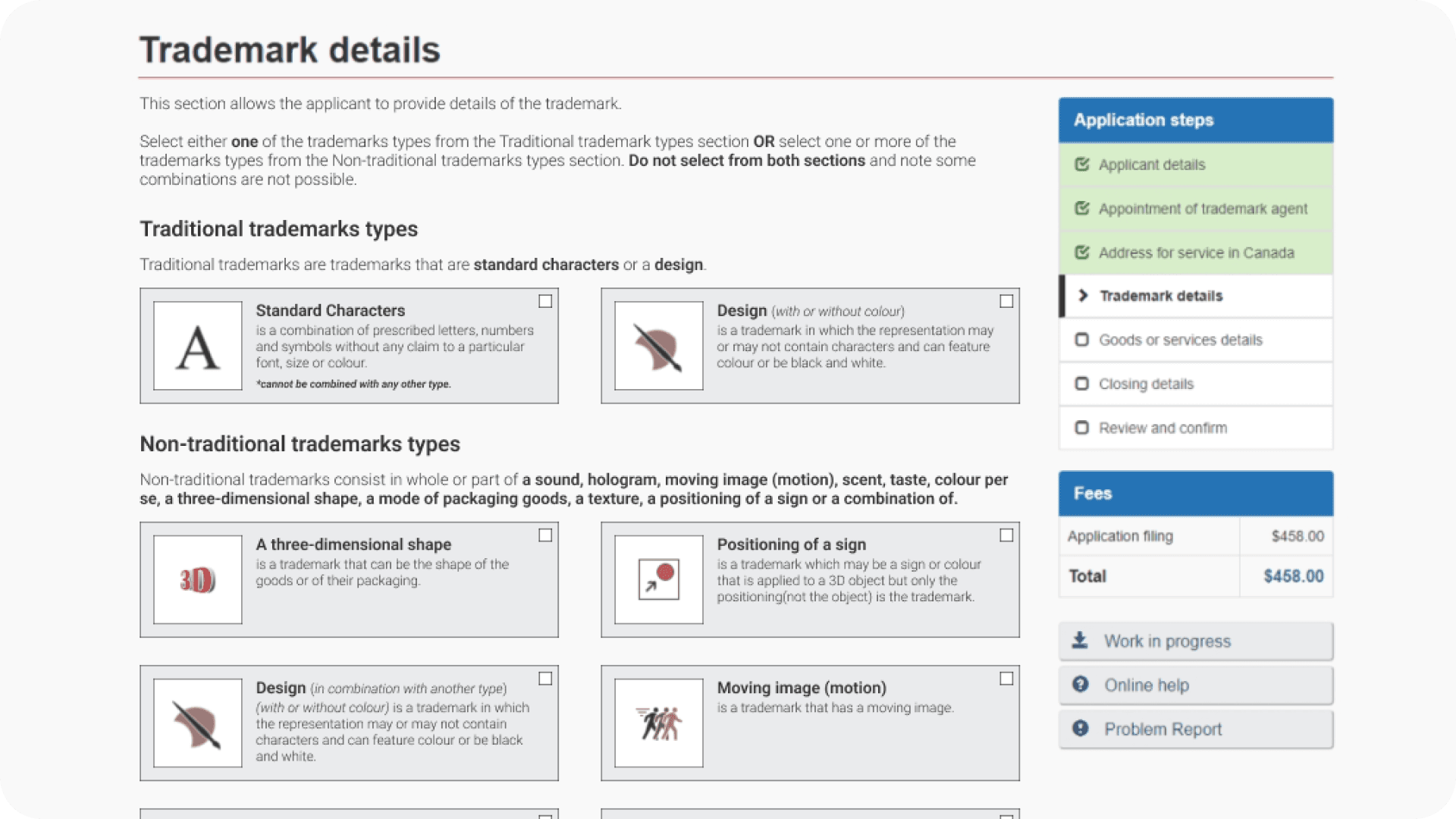
Expand each card to show its definition inline, giving applicants a plain-language explanation of each trademark type directly on the card, with no extra clicks or hovers required.
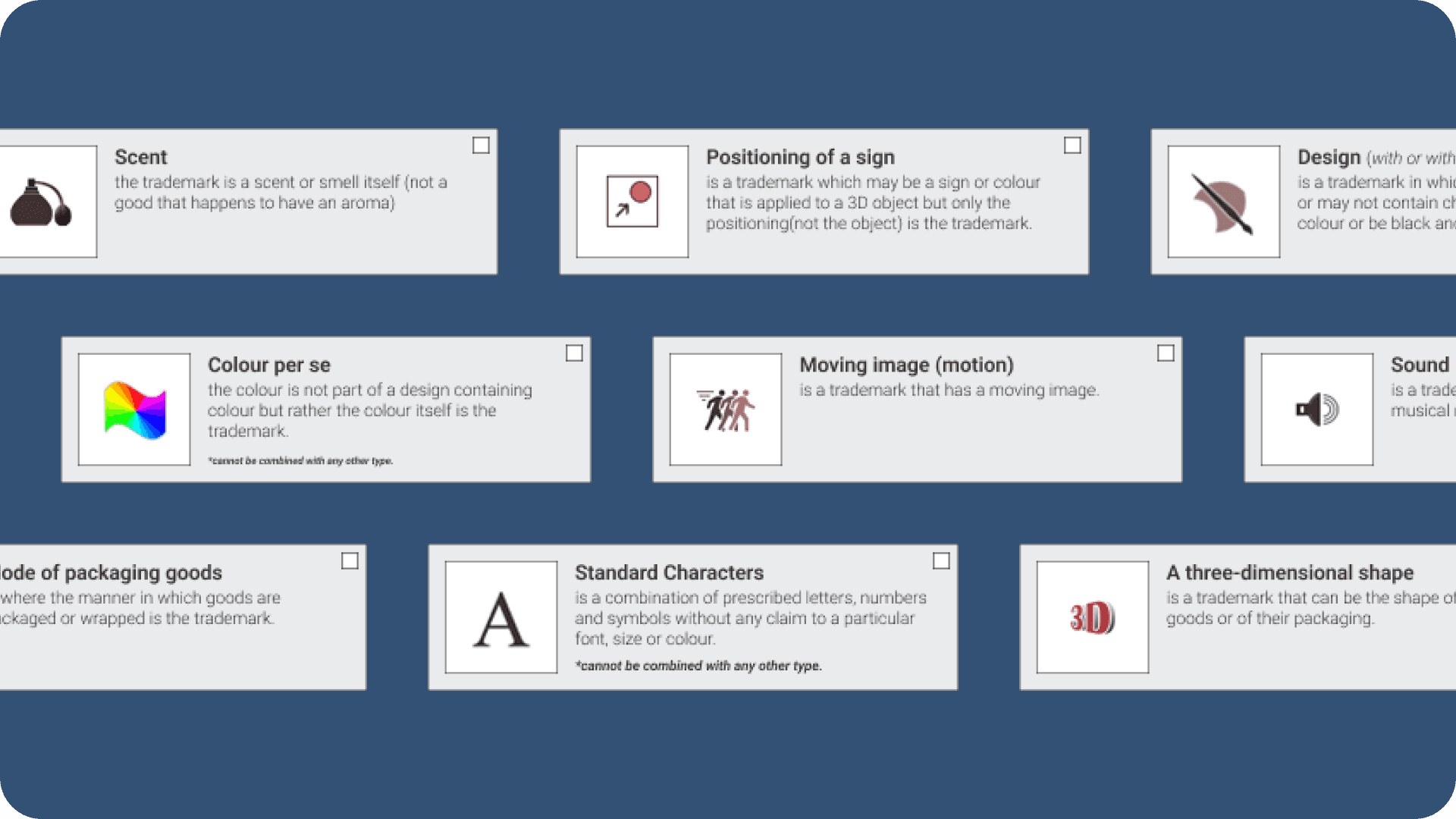
Disable incompatible combinations by greying out/disabling cards when a selection makes certain other types impossible under Canadian trademark law, preventing invalid combinations entirely.
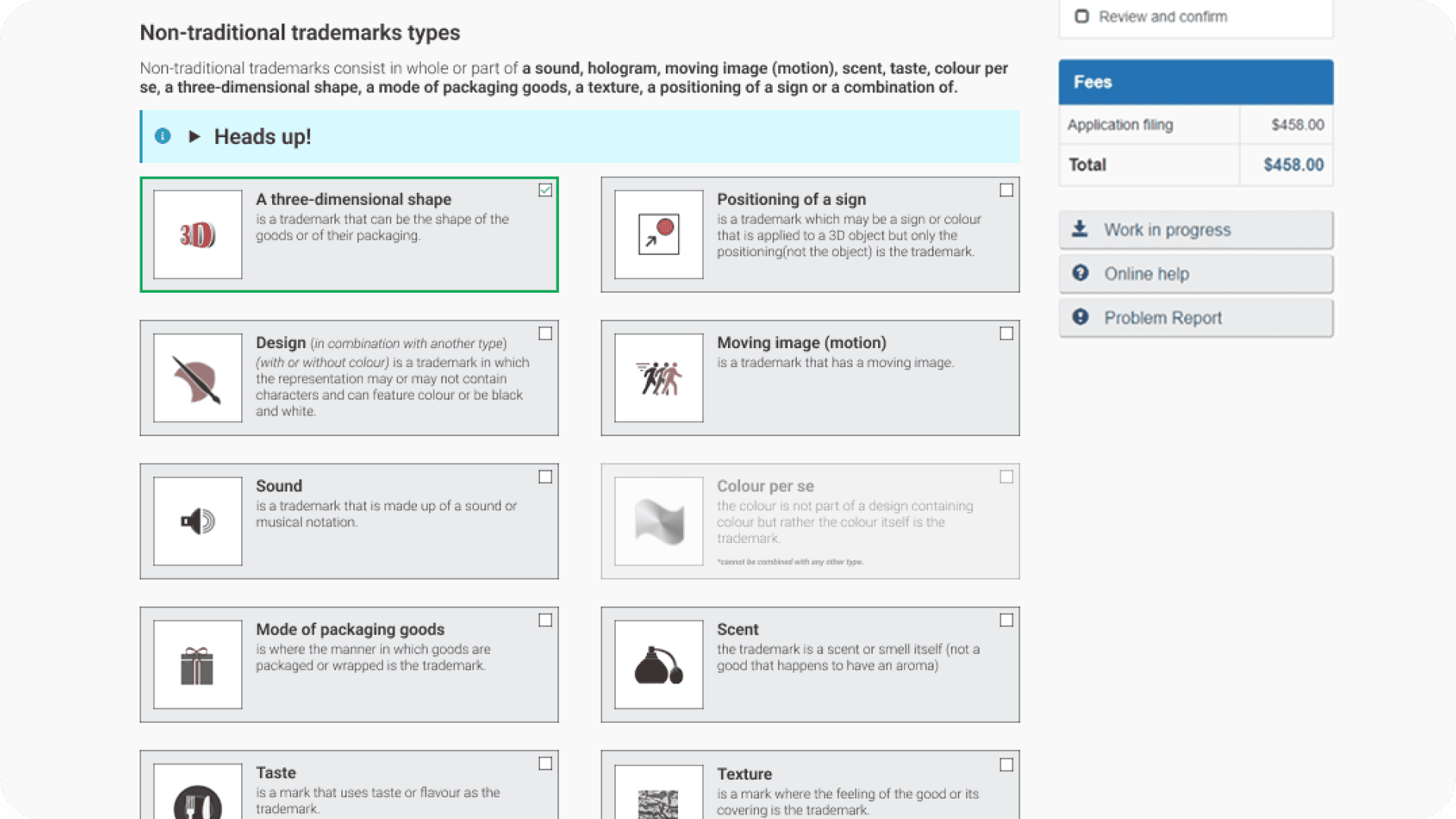
Show collapsible alerts for commonly confused types — for example, when “Three Dimensional Shape” is selected, a “Heads up!” alert appears explaining the difference between a 2D design shown in 3D and an actual three-dimensional mark.
Outcome
These modifications shipped on the live Trademarks eServices platform. The layered approach to educate, guide, and prevent was designed to eliminate confusion at the point of entry rather than correcting it downstream through costly staff interventions and round trips.
Online Learning Program — From Zero to Launch
Starting Point
When I joined the team, most training was classroom-based and instructor-led. There were zero self-paced online courses. I had no prior experience with Learning Management Systems — Moodle was entirely new to me.
What I built
I learned Moodle actively and quickly on the job, and by the end of my tenure I was the team’s subject matter expert for the platform. I developed the branch’s first-ever self-paced online course on the topic of Non-Traditional Trademarks. Since it was the first, the process was extensive — multiple iterations, close collaboration with subject matter experts for content accuracy, and usability testing for both content comprehension and course navigation.
By the time I left, the team had multiple online courses of varied lengths, including two full courses: Non-Traditional Trademarks and Divisionals and Mergers. These represented a fundamental shift in how the branch delivered training.
Usability Testing
I conducted usability testing sessions for the online courses we developed, evaluating both content clarity and navigation within the LMS. Findings from these sessions directly informed iterative improvements to course structure, instructional language, and interaction patterns.
AI Agent for Quality Assurance Officers
The Problem
Quality Assurance officers review trademark files that have already been examined. Their job is to quickly verify whether an examiner’s decision is correct and consistent with Canadian trademark regulations. This involves internet searches, cross-referencing file details against acts and regulations, and validating reasoning — essentially an examiner’s work, but at an overview pace across a high volume of files. Doing this manually for each file was time-consuming and repetitive.
The Approach
When Radia — an in-house AI platform developed by another federal department — was introduced to our team, upper management encouraged experimentation. Radia acted as an aggregator for multiple LLMs (including Gemini, OpenAI, and Claude) with a chat-based interface.
I designed a custom instruction set and saved it as a dedicated agent within Radia. The agent was purpose-built for the QA workflow: officers could enter multiple trademark files and have them checked against standard laws and regulations, with internet searches performed and annotated automatically.
Outcome
The agent allowed QA officers to review files in a fraction of the time previously required. Accuracy exceeded 90%, with the tool’s annotated search results providing a transparent audit trail. The project demonstrated how prompt engineering and workflow design could meaningfully improve productivity in a compliance-heavy government context.
Supporting Work
Beyond the spotlight projects, I contributed across a range of design, technical, and communication activities that supported the team’s day-to-day operations and longer-term goals.
AI Voice Podcasts
To diversify the modes through which the team delivered learning, I proposed and developed AI-generated voice podcasts as supplementary material. The idea was to create a resource learners could engage with passively — listening to gather knowledge outside of structured course time.
The podcasts were designed as conversations between two voices and produced using Radia’s voice/podcast agent. They served as secondary learning products alongside the online courses, extending the reach of content without requiring additional instructor time.
Video Production
I created introductory and explainer videos for our online courses and learning materials using Premiere Pro and Camtasia. These included AI-generated voiceovers combined with stock footage for course intro videos, as well as walkthrough and tutorial videos built from screen captures with narration. The videos served as entry points for learners and provided step-by-step guidance for more complex processes.
Interactive Tools & Code Snippets
I experimented with AI tools and LLMs to develop custom code snippets for use within our Moodle courses. While custom code had limitations — it was not reviewed for accessibility by the Moodle platform — we found valuable internal use cases.
The most notable was a training completion tracker embedded directly within an online course. All employees could check off and enter completion dates for their mandatory annual trainings, then export the record as an Excel file to send to their managers during performance reviews. It solved a real administrative pain point with a simple, self-contained tool.
Presentations & Visual Design
I regularly presented to the team on emerging technologies, AI tools, and UX principles — helping build the team’s awareness and vocabulary around design thinking. I also supported my manager and deputy director by creating visual assets, infographics, and polished presentation decks for their internal and external communications.
Additional Contributions
SharePoint - Centralized Work Tool
Assisted in maintaining and developing the branch’s centralized resource hub, built by a partner team. I contributed UX recommendations for structure and usability improvements alongside regular content updates.
Accessibility
Accessibility was embedded across all work — from online course design to eServices modifications to document formatting. Ensuring compliance with Government of Canada accessibility standards was a consistent consideration rather than a standalone task.
Reflection
This role taught me what it means to be the person who figures it out. There was no design team to lean on, no established workflow for digital learning, and no precedent for most of what I ended up building. The work ranged from prompt engineering to usability testing to video editing to standing in front of the team explaining what UX even is.
What I took away is that design thinking isn’t a role. It’s a lens. Whether I was restructuring a government form, building a chatbot instruction set, or learning Moodle from scratch, the approach was always the same: understand the problem, understand who it affects, and design the simplest thing that actually helps.